Bulk editor

Business management tool that allowed user to make changes across all their listings with only a single action.

Before

After

Changes had to be made per-listing

Updating a price, a description, an availability window, anything had to be repeated per-listing.

Changes applied across all selected listings

One bulk edit applies the same changes across any combination of selected listings.

Business-wide changes were a time sink

Clients with large portfolios, some with over 200, spent proportionately more time making updates.

Time cost decoupled from business size

A change that once took 100 repetitions now takes one.

Listings less likely to be updated

Small, routine updates became a disproportionately heavy lift, discouraging clients from keeping listings current.

Clients encouraged to keep listings current

Listings are kept current more often, since the effort-to-value ratio for routine updates dropped substantially.

Before

Changes applied across all selected listings

One bulk edit applies the same changes across any combination of selected listings.

Clients encouraged to keep listings current

Listings are kept current more often, since the effort-to-value ratio for routine updates dropped substantially.

Time cost decoupled from business size

A change that once took 100 repetitions now takes one.

After

The process

Scope

Scope

Selection

Checkboxes for selection lived directly on the existing listings table, no new surface needed.

Fields

The same field set as the single-listing editor, minus anything listing-specific.

Conflict handling

Fields with an entry overwrites that field across every selected listing. Unchanged fields remain unchanged.

Change fields overwrite existing values. Unchanged fields remain unchanged.

Workflow

This project provided the opportunity to drastically speed up the process for our clients. Lacking any kind of bulk functionality, Clients were left tediously going through their listings one by one to make changes.

The bulk editor replaces that with the much-requested ability for a single change to be applied to any number of listings instantly.

Workflow

This project provided the opportunity to drastically speed up the process for our clients. Lacking any kind of bulk functionality, Clients were left tediously going through their listings one by one to make changes.

The bulk editor replaces that with the much-requested ability for a single change to be applied to any number of listings instantly.

Select listings

Edit fields

Review changes

Apply!

Selecting listings

Utilizing the already built listing index view, clients could select the listings they wanted to change with the related checkbox. If at least one listing was selected, the bulk action bar would appear at the bottom of the screen, and would be the entry point into the bulk editor.

Selecting listings

Utilizing the already built listing index view, clients could select the listings they wanted to change with the related checkbox. If at least one listing was selected, the bulk action bar would appear at the bottom of the screen, and would be the entry point into the bulk editor.

Editing fields

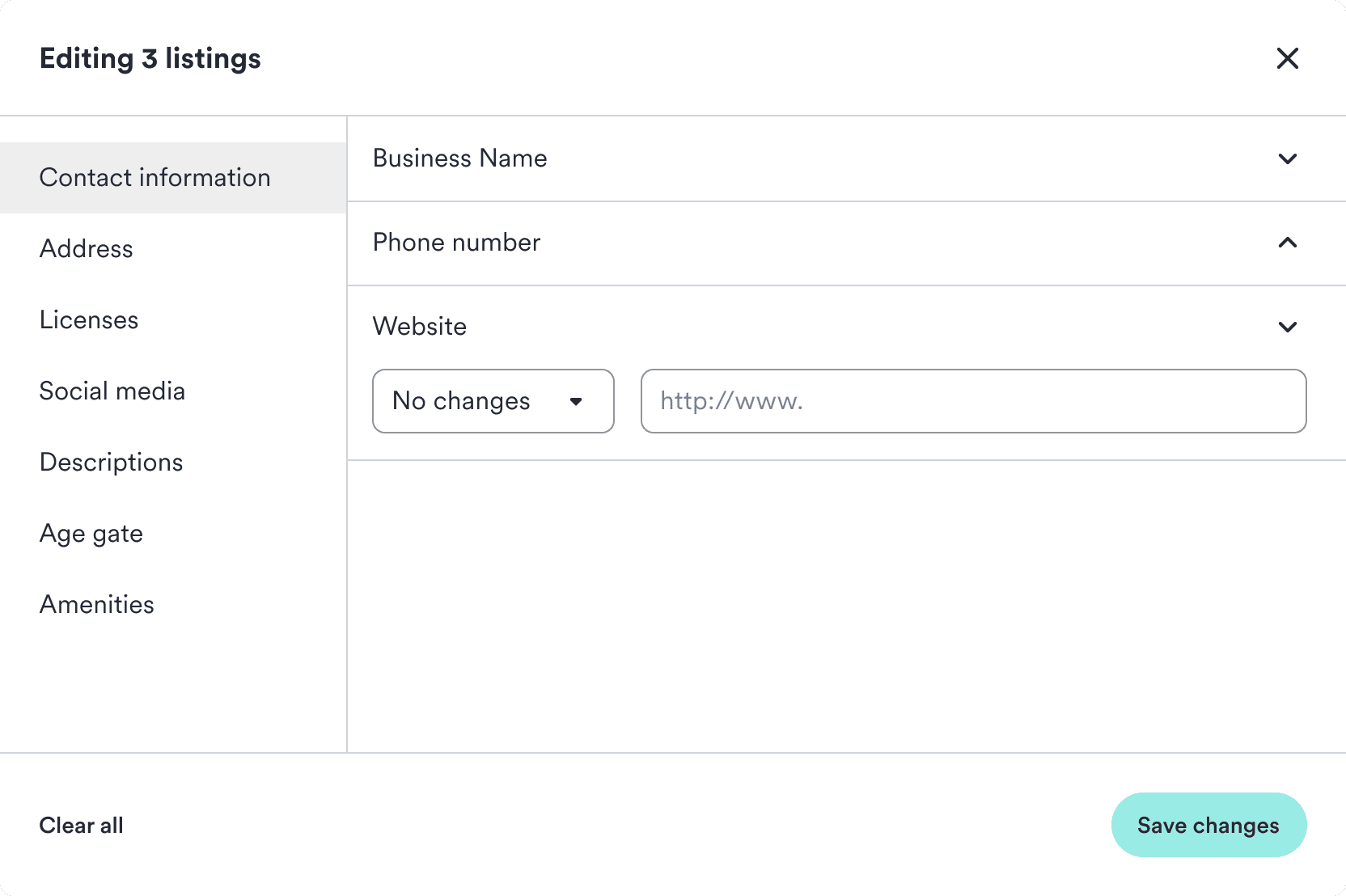
Fields were grouped into the same sections that could be found on the individual listing editor. Since this tool also had the potential to make mistakes bigger, it had to be clear exactly what was going to be changed.

Fields were placed under accordions, which made it more obvious at a glance what was changed, and also helped account for when an attribute needed multiple entries. Clicking an accordion would automatically have the first input field selected, ready for text input.

Editing fields

Fields were grouped into the same sections that could be found on the individual listing editor. Since this tool also had the potential to make mistakes bigger, it had to be clear exactly what was going to be changed.

Fields were placed under accordions, which made it more obvious at a glance what was changed, and also helped account for when an attribute needed multiple entries. Clicking an accordion would automatically have the first input field selected, ready for text input.

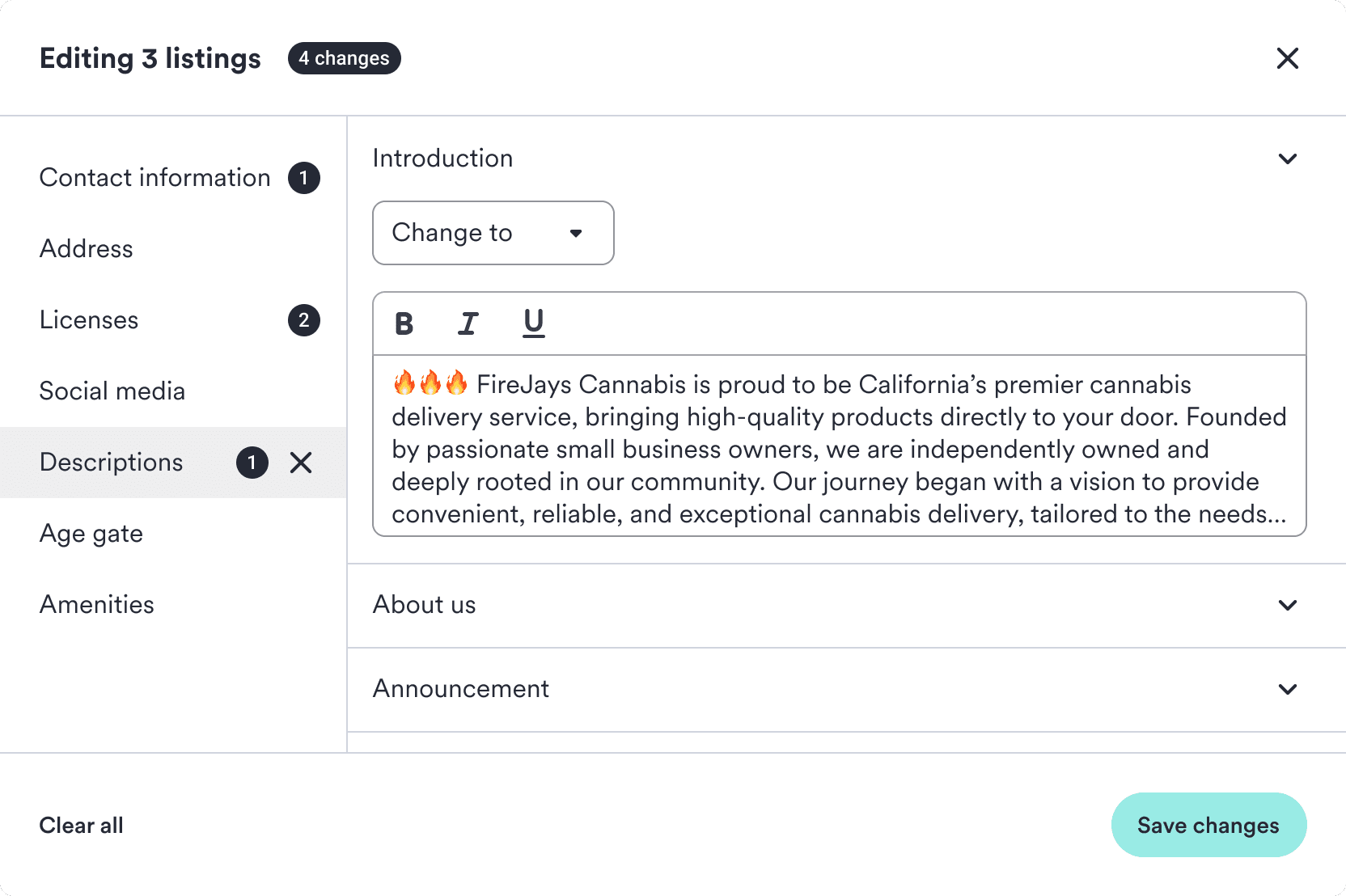
Next to each input lived a dropdown that indicated the desired change status. Once the client started typing, it would automatically update from "No changes" to "Change to". Similarly, it would revert back if all text was removed from the field. This allowed the user to be absolutely certain if something was going to change or not.

User could also manually interact with the change dropdown, allowing them to show more intention, or remove content from that field if they so desired.

Next to each input lived a dropdown that indicated the desired change status. Once the client started typing, it would automatically update from "No changes" to "Change to". Similarly, it would revert back if all text was removed from the field. This allowed the user to be absolutely certain if something was going to change or not.

User could also manually interact with the change dropdown, allowing them to show more intention, or remove content from that field if they so desired.

With the tool organized into sections, the amount of changes made per section were indicated in the side bar. This allowed the user to always have the full scope of their changes in mind and clear changes on a per-section basis.
Reviewing changes

To help avoid mistakes, I made the decision to slow the user down with one last step. After all the changes were made, the next page of the tool displayed a summary of everything to be updated. Changed fields and their new values were represented, and any removal of information was brought to attention by highlighting in red.

If everything looked good, the client pressed save changes, and all their selected listings were updated.

Reviewing changes

To help avoid mistakes, I made the decision to slow the user down with one last step. After all the changes were made, the next page of the tool displayed a summary of everything to be updated. Changed fields and their new values were represented, and any removal of information was brought to attention by highlighting in red.

If everything looked good, the client pressed save changes, and all their selected listings were updated.

Impact

Clients and internal users experienced a much quicker updating process. This in turn encouraged clients to keep their listings up to date, and our customer success team saw a reduction in the amount of support calls related to listing updates.

Impact

Clients and internal users experienced a much quicker updating process. This in turn encouraged clients to keep their listings up to date, and our customer success team saw a reduction in the amount of support calls related to listing updates.

30% less listing edit related support calls

What could take 20 minutes now took 10 seconds

15% increase in listing updates